
Your website might need five good pages and an enquiry form. It might be a WordPress shop, a portfolio, or a site you want to build yourself. Those are different jobs, and the right hosting starts with knowing which one you have.
You can pay for Nakroteck hosting with Mobile Money without a dollar card. Here is how to choose a suitable plan, understand the cedi amount at payment, and get started without buying more than you need.
Start with how you will build your website
Before comparing storage, ask your developer what the website runs on. If you are building it yourself, decide which editor you want to use.
| Your situation | Where to start |
|---|---|
| You have a general website or custom code. | Shared web hosting. Check that your software and resource needs fit the plan. |
| You are building or moving a WordPress website. | Managed WordPress hosting, designed specifically for WordPress. |
| You want to build visually with Nak Builder. | Nak Builder, using the Site.pro editor. |
| Your application needs a particular server setup. | A VPS, after checking the technical requirements and who will manage it. |
A school website does not automatically need a large plan, and a one-page site is not automatically lightweight. Photos, downloads, email storage and the software behind the page all count.
Choosing among the shared hosting plans
For a general website that fits shared hosting, these are useful starting points:
- Basic: one website with a modest storage requirement, such as a small portfolio or landing page.
- Economy: one business, church, school or organisation website that needs more room for content and email.
- Deluxe: several websites, or a site with a larger collection of images and documents.
- Platinum: a larger collection of websites that still fits shared hosting. Check the storage and other resource limits even where a feature is described as unlimited.
Use the current plan comparison to check website counts, storage, mailboxes and the billing period. Include domain renewal, paid themes or plugins, and any development work in your budget too.
WordPress, Nak Builder or a VPS?
Choose managed WordPress when WordPress is the platform you want. Compare the website allowance, storage, email limits and included management services on the WordPress plans page. These plans are for WordPress websites; unrelated custom applications need suitable hosting of their own.
Choose Nak Builder when you want to work in the Site.pro editor. It suits people who want to start from a design and edit their own pages visually. Nak Builder hosting is for Site.pro websites. Check the current plan’s features before choosing it for a shop or a particular business tool.
Consider a VPS when there is a specific technical reason. Your developer might need software or server settings unavailable on shared hosting. A slow website alone is not enough to decide: large images, plugins or inefficient code may be the cause. Ask us to review the requirement and confirm the management responsibilities before ordering.
USD prices, cedi payments: what to expect
Nakroteck lists its base prices in US dollars. This reflects costs such as domains and servers that we also pay for in dollars.
Where a cedi equivalent is displayed, treat it as an estimate for comparing plans. Check the final GHS amount shown before you authorise payment. The exchange rate can change, so the cedi amount for a future renewal may differ even when the USD price stays the same.
This guide links to current plan prices rather than fixing a cedi figure into the article. When comparing monthly and annual options, check the total due for the billing period, not only the monthly equivalent.
How to pay with Mobile Money
Once you have chosen your plan and reviewed the order or invoice, follow the payment instructions. The wording can vary by network and payment screen.
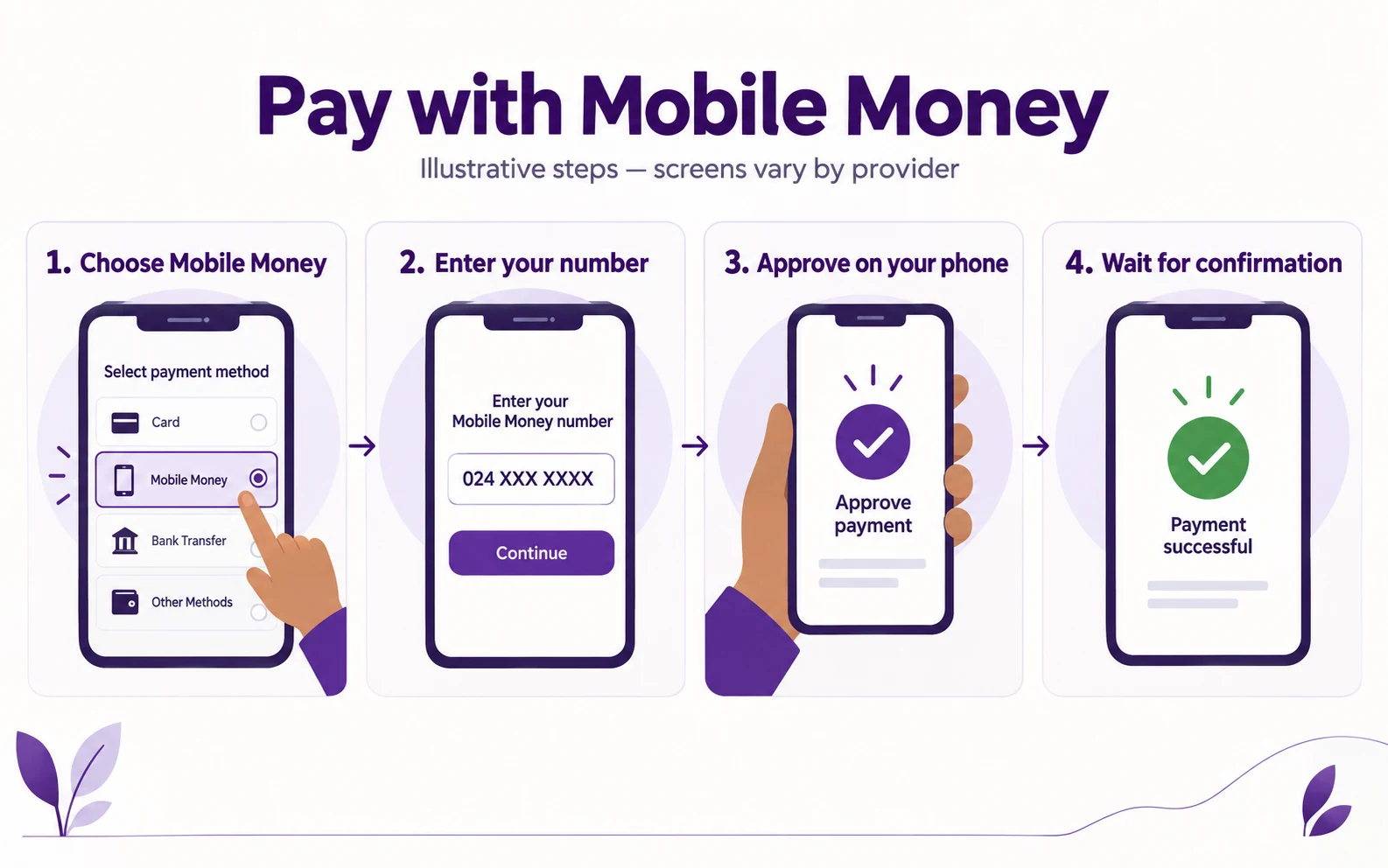
Illustration using a masked example number, not a screenshot of the checkout. Follow the options available on your payment screen.
- Review the amount and service. Check the domain spelling, billing period and final GHS total.
- Choose Mobile Money in the payment window.
- Enter your MoMo number and select your network where prompted, then confirm to request payment.
- Approve the request on your phone using your provider’s instructions. Keep your MoMo PIN private.
- Wait for confirmation. Return to the invoice or order and check its payment status. A payment confirmation and a hosting setup confirmation are separate steps.
If your wallet was debited but the invoice still shows unpaid, contact support with the invoice number and transaction reference before paying again. If no prompt arrives, check the number and network you selected.
Mobile Money does not support automatic recurring charges through this Paystack payment channel. Plan to pay each renewal invoice before its due date. Paystack explains the process in its Mobile Money payment guide.
Choose a domain that customers can remember
A short, clear name is easier to say on the phone and print on a business card. A .com can suit a broad audience; a .com.gh can help signal a Ghanaian business.
Check availability and current registration and renewal prices with our domain search. A .com.gh registration requires supporting company registration documents under the registry’s registration policy, so allow time for the required checks.
Already own a domain? It can often stay with its current registrar and connect through DNS. Confirm the records to change, especially if you already use email on that domain.
Moving an existing website?
Before buying, send us the domain, website platform and details of any email that needs to move. We will confirm compatibility, what the migration covers, any charges and the expected timing.
Keep the existing hosting active until the website, forms and email have been checked at the destination. DNS changes can take time to reach everyone, so schedule the move around important business activity. We cannot promise that every migration will have no interruption.
Your next step
Write down three things: what your website runs on, how many websites you need, and how you use email. Then compare the current plans, or send those details to our team if you would like help choosing.
You do not need the biggest plan to begin. You need a plan that fits the website you are building, a clear renewal budget, and someone to ask when you get stuck.
Need help choosing the right setup?
Talk to Nakroteck before you buy hosting, domains, SSL, or website services. We will help you choose the right option for your business.